
Digital Video Engineering: From Pixels to Packets
This guide covers the fundamental building blocks of digital video, from basic resolution and color science to legacy hardware (SDI) and modern IP-based workflows (SMPTE 2110).
1. Video Resolution and Bandwidth
Resolution defines the spatial detail of a video frame. Higher resolution equals more pixels, which directly translates to more data, higher bandwidth requirements, and increased storage needs.
Common Raster Sizes

| Format | Resolution | Context |
|---|---|---|
| SD (NTSC/PAL) | 720×480 / 720×576 | Legacy broadcast |
| HD (720p) | 1280×720 | Early HD broadcast |
| Full HD (1080p/i) | 1920×1080 | Standard broadcast/Blu-ray |
| QHD / 2K | 2560×1440 | Computer displays / Gaming |
| UHD (4K) | 3840×2160 | Consumer 4K TV (16:9) |
| DCI 4K | 4096×2160 | Cinema standard (approx 1.90:1) |
| 8K UHD | 7680×4320 | Next-gen broadcast |
Bandwidth Calculation
To estimate uncompressed bandwidth (ignoring overhead), use the following relationship:
$$Bitrate \approx Width \times Height \times Frame_Rate \times Bits_Per_Pixel$$
Scaling Factor: Doubling resolution in each dimension (e.g., 1080p to 4K) results in ~4x the pixel count.
Impact: This exponential growth stresses link interfaces (SDI/IP), storage arrays, and playback hardware.
2. Scanning: Interlaced vs. Progressive
How video frames are drawn on the screen impacts motion handling and compression efficiency.
Progressive (p)
Mechanism: Each frame contains all lines (1, 2, 3...) drawn sequentially.
Usage: Modern OTT, streaming, HDR, and cinema.
Pros: Cleaner fast motion, better compression, and easier scaling.
Interlaced (i)
Mechanism: Each frame is split into two fields:
- Field 1: Odd lines.
- Field 2: Even lines.
Usage: Legacy broadcast (reducing bandwidth on analog systems).
Cons: "Combing" artifacts on motion, requires complex deinterlacing, and is inefficient for modern compression.
Interview Key Concept
Interlaced video splits frames into two fields to save bandwidth but introduces motion artifacts. Progressive video sends full frames, offering cleaner motion and better compression, making it the standard for modern streaming.
3. Color Representation
Video engineers must balance color fidelity with bandwidth constraints.
3.1 RGB vs. Y'CbCr
RGB: Three channels (Red, Green, Blue). Ideal for computer graphics and VFX.
Y'CbCr (aka YUV): Separates brightness (Luma/Y') from color (Chroma/Cb/Cr). This exploits human vision, which is more sensitive to brightness than color detail, allowing for data savings.
3.2 Chroma Subsampling (4:4:4 vs. 4:2:2 vs. 4:2:0)
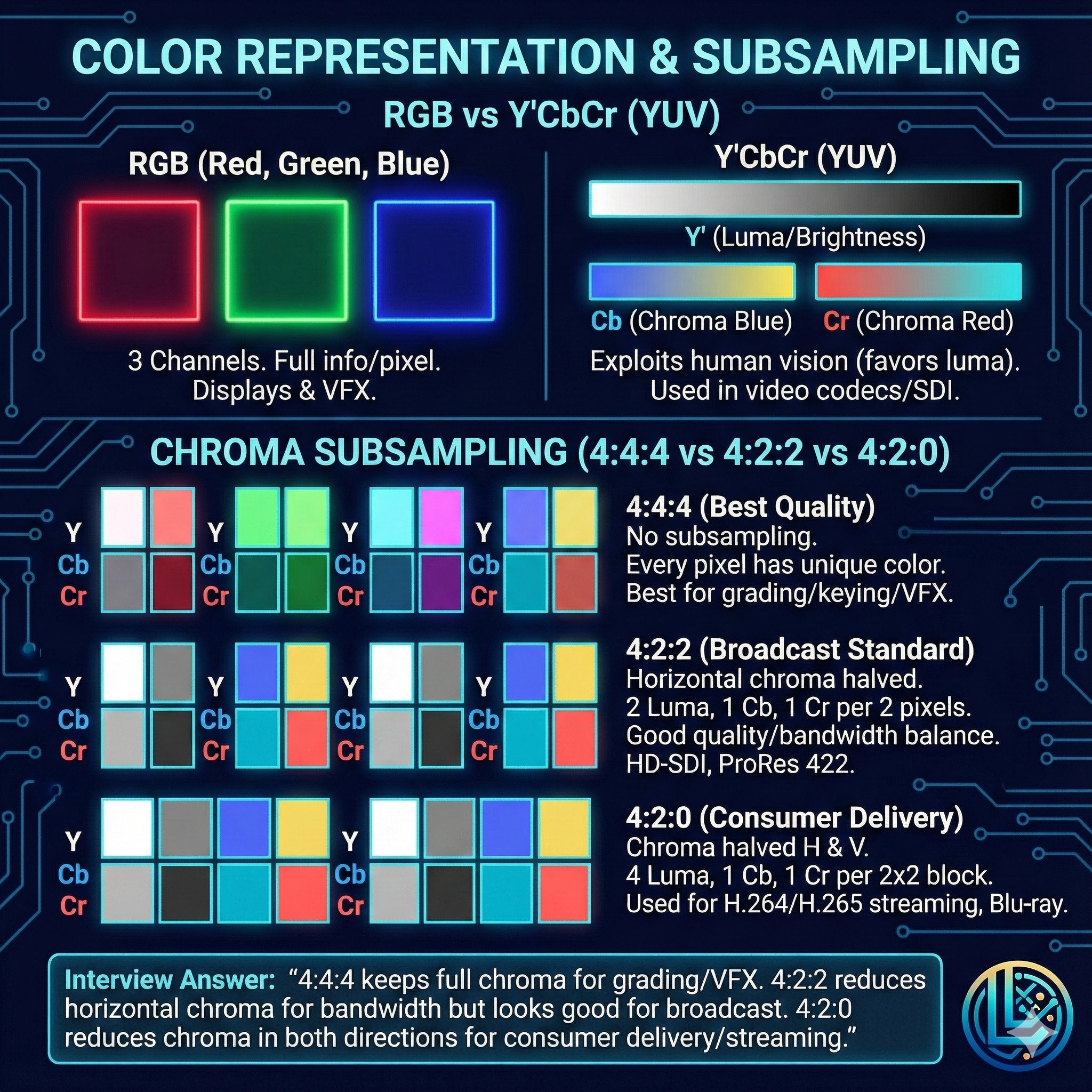
Subsampling reduces color resolution while keeping brightness (Luma) full resolution.
- 4:4:4: No subsampling. Every pixel has unique Color/Luma. (Used for: High-end VFX, Grading).
- 4:2:2: Horizontal color resolution is halved. (Used for: Broadcast mastery, ProRes 422).
- 4:2:0: Color is halved both horizontally and vertically. (Used for: Consumer delivery like Blu-ray, Netflix, H.264).
Interview Key Concept
4:4:4 keeps full chroma for grading accuracy. 4:2:2 halves horizontal chroma to save bandwidth but maintains broadcast quality. 4:2:0 reduces chroma in both directions for efficient consumer delivery.
4. Compression and Codecs
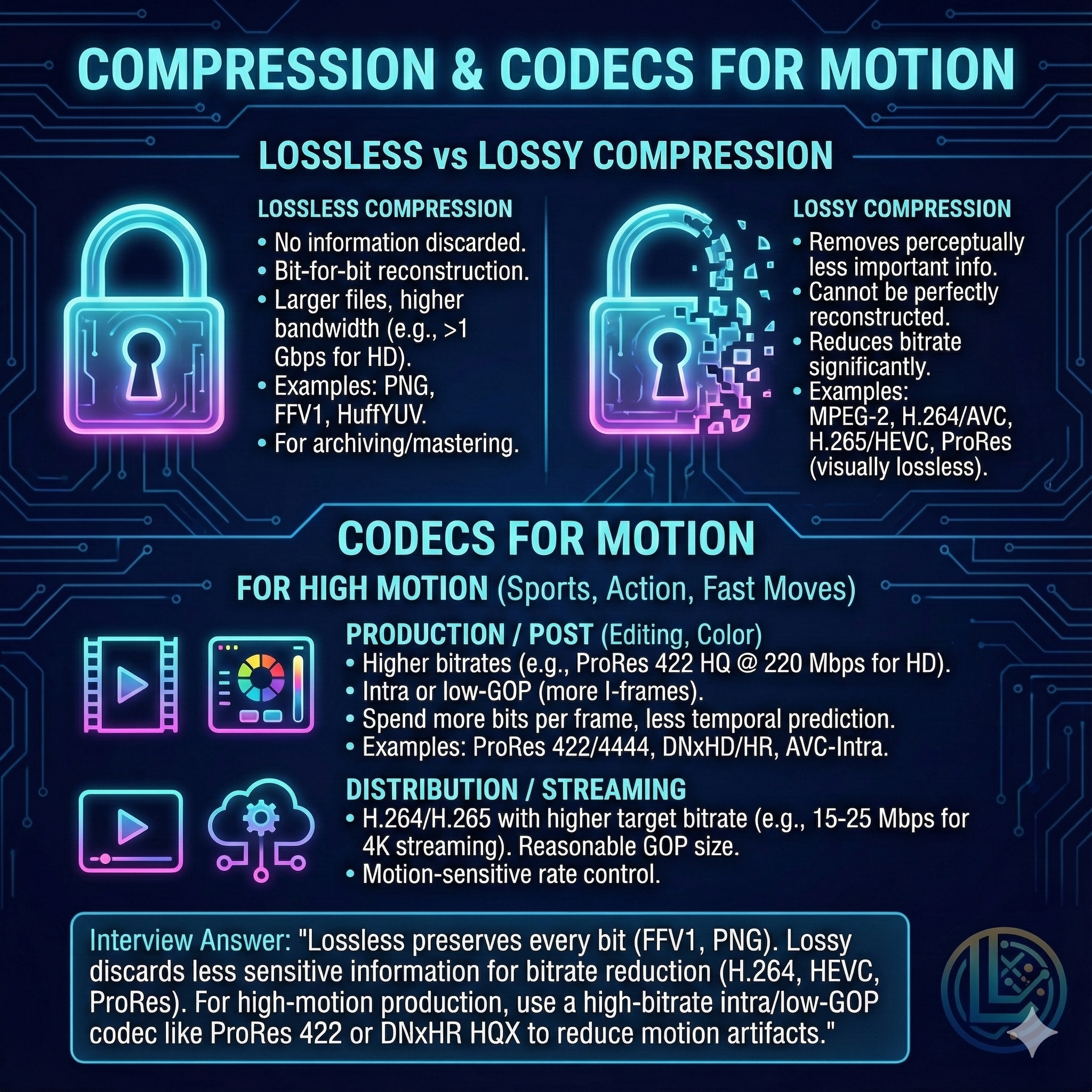
4.1 Lossless vs. Lossy
Lossless: No data discarded (e.g., PNG, FFV1). Perfect reconstruction but massive file sizes. Used for archiving.
Lossy: Discards "perceptually unimportant" data (e.g., H.264, ProRes). Cannot be perfectly reconstructed but saves massive amounts of space.
4.2 Handling Motion
For high-motion content (sports, action), the choice of codec is critical.
Production/Post: Use Intra-frame codecs (ProRes, DNxHR). Every frame is encoded independently (or in small groups), reducing processing load and artifacts.
Distribution: Use Long-GOP codecs (H.264/H.265) with high bitrates and robust motion estimation.
Interview Key Concept
For high-motion production, use high-bitrate Intra or low-GOP codecs (like ProRes). They rely less on predicting future frames, reducing motion artifacts and keeping the image stable during fast action.
5. Hardware Transport: SDI vs. NDI
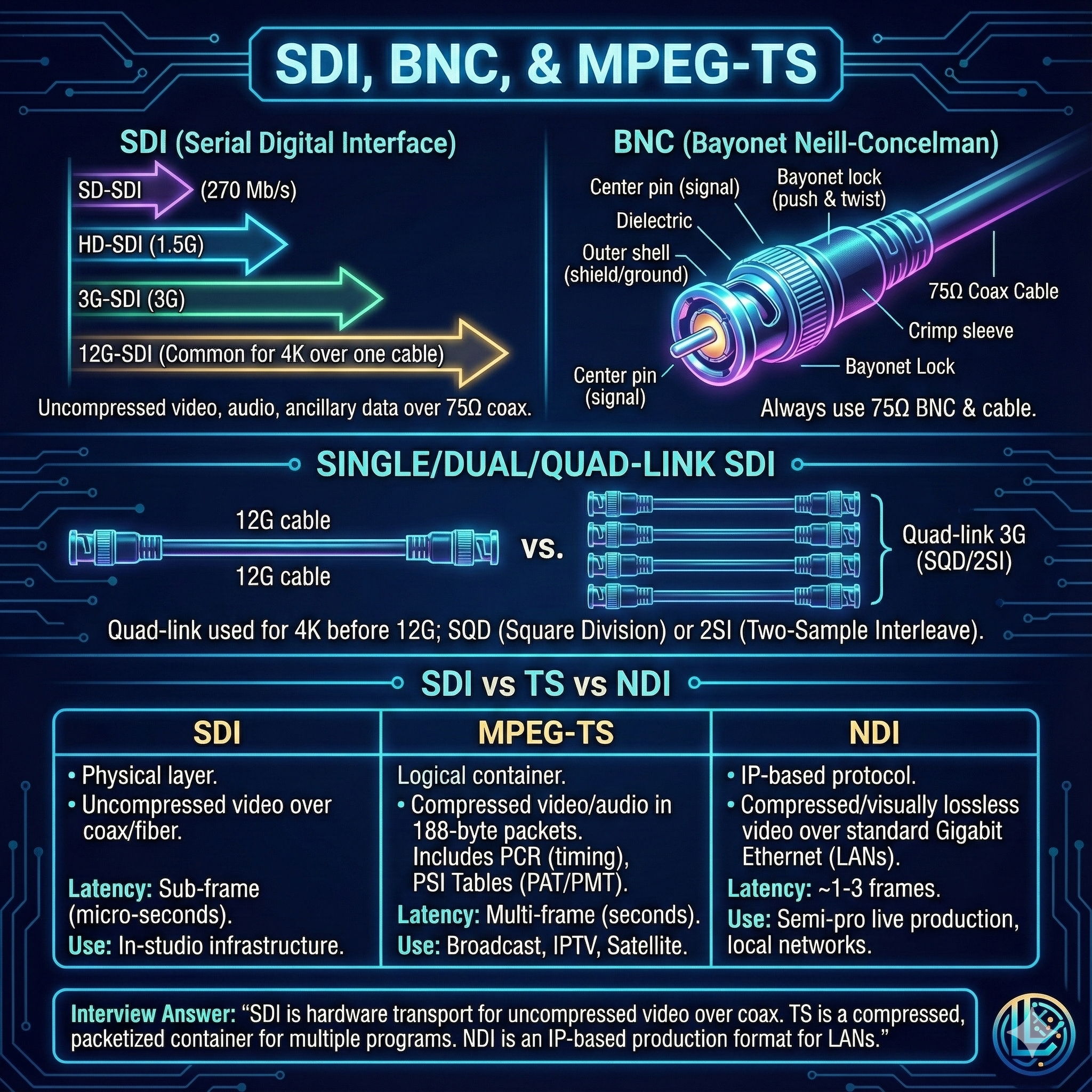
5.1 SDI (Serial Digital Interface)
The industry standard for uncompressed baseband video over coaxial cable.
Connector: BNC (Bayonet Neill–Concelman) – specific 75Ω locking connector.
Speeds:
- HD-SDI: 1.5 Gbps (1080i)
- 3G-SDI: 3 Gbps (1080p60)
- 12G-SDI: 12 Gbps (4K 60p over a single cable)
5.2 NDI (Network Device Interface)
Type: Software-driven IP video (proprietary to NewTek).
Usage: Runs over standard 1GbE/10GbE LANs.
Pros: Flexible, no specialized routers needed.
Cons: Compressed (visually lossless), slightly higher latency than SDI.
6. Transport Streams (MPEG-TS)
MPEG-TS is a container format used to broadcast compressed video, audio, and data.
PCR (Program Clock Reference): A timestamp embedded in the stream to synchronize the decoder's clock with the encoder, preventing audio/video drift.
SPTS vs. MPTS:
- SPTS: Single Program (one channel).
- MPTS: Multi-Program (multiple channels muxed together, e.g., for Cable/Satellite).
PSI Tables: Maps that tell the receiver how to decode the stream.
- PAT: Lists programs.
- PMT: Lists PIDs (Packet IDs) for Audio/Video.
7. Video Over IP: SMPTE 2110 & Protocols
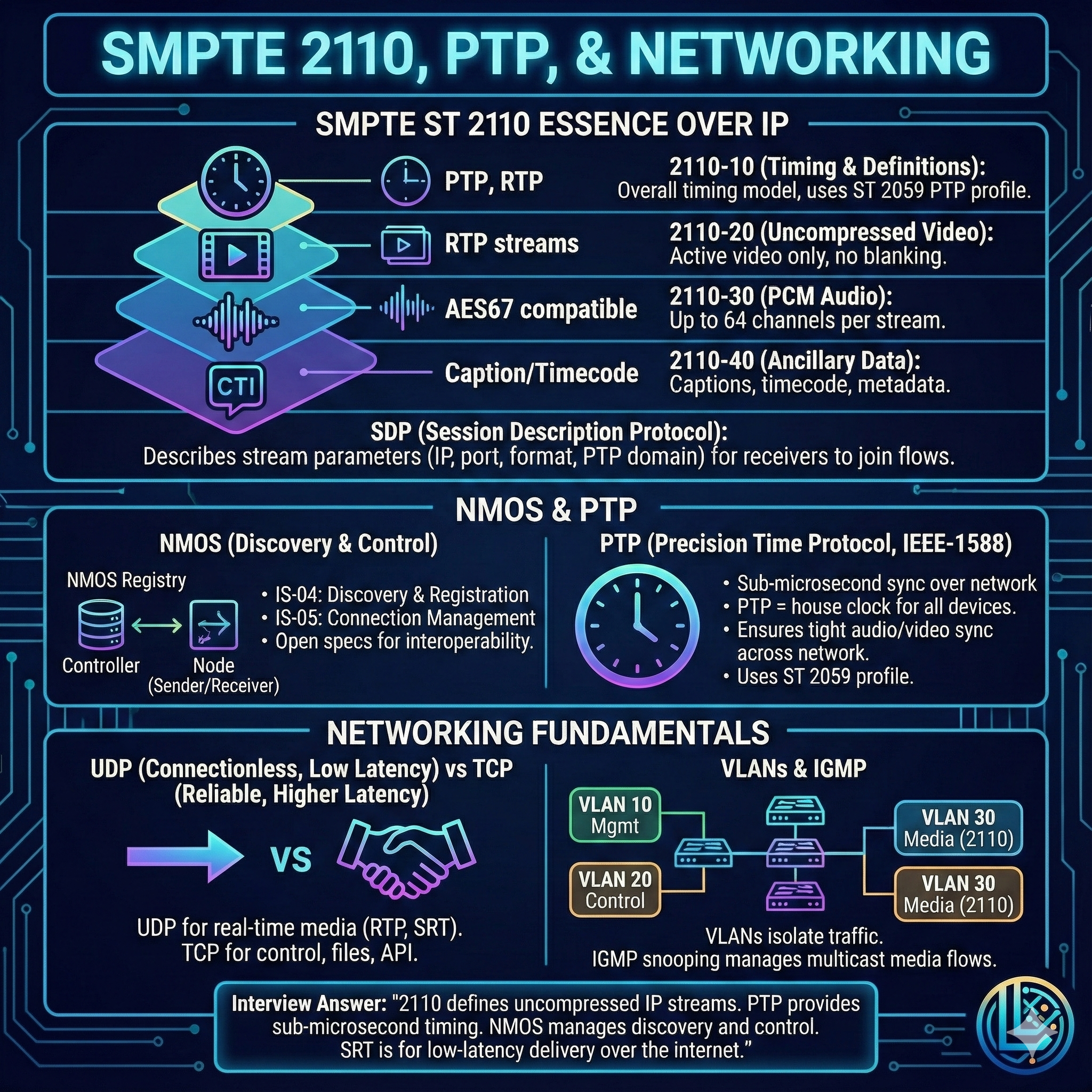
Modern broadcast facilities are moving from SDI to IP infrastructure using the SMPTE 2110 suite.
SMPTE ST 2110 Standards
- 2110-10: System Timing (PTP) & Definitions.
- 2110-20: Uncompressed Video.
- 2110-30: Uncompressed Audio (PCM).
- 2110-40: Ancillary Data (Captions, Timecode).
Critical Protocols
SDP (Session Description Protocol): A "file" that tells the receiver the IP, port, and format of the stream it needs to catch.
NMOS (IS-04/IS-05): The "control plane."
- IS-04: Discovery (Find devices).
- IS-05: Connection (Tell device A to send to device B).
PTP (Precision Time Protocol - IEEE 1588):
- Unlike NTP (millisecond accuracy), PTP offers sub-microsecond accuracy.
- Required for 2110 to keep separate audio and video IP packets perfectly synced.
SRT (Secure Reliable Transport):
- Used for sending video over the Public Internet.
- Uses UDP with ARQ (Automatic Repeat Request) to fix packet loss without the latency of TCP.
8. Networking Fundamentals for Broadcast
Video engineers must now understand IP networking.
Traffic Types
- Unicast: One-to-One. (Standard internet traffic).
- Multicast: One-to-Many (Subscription based). Essential for efficient IPTV and SMPTE 2110 within a facility.
- Broadcast: One-to-All. (Inefficient, limited by VLANs).
Transport Layer: UDP vs. TCP
- TCP: Reliable, ordered, acknowledges every packet. High latency. (Bad for live video).
- UDP: "Fire and forget." No guarantees, but very low latency. (Standard for RTP, 2110, and streaming).
VLANs and IGMP
VLAN (Virtual LAN): Logically separates traffic (e.g., separates heavy Video traffic from Office Wi-Fi) to improve security and performance.
IGMP Snooping: A switch feature that prevents Multicast video from flooding every port. The switch only sends video to ports that explicitly ask for it.
Interview Key Concept
VLANs segment network traffic for security and traffic management. IGMP Snooping ensures that high-bandwidth multicast video is only forwarded to the specific ports that need it, preventing network congestion.
Summary
Digital video engineering requires understanding multiple layers:
- Resolution and Bandwidth: Higher resolution exponentially increases data requirements.
- Scanning: Progressive is the modern standard; interlaced is legacy.
- Color Science: Y'CbCr with chroma subsampling balances quality and bandwidth.
- Compression: Choose codecs based on production vs. distribution needs.
- Transport: SDI for traditional baseband, IP (2110/NDI) for modern workflows.
- Networking: Understanding multicast, VLANs, and IGMP is essential for IP-based systems.
Mastering these fundamentals enables engineers to design, deploy, and troubleshoot professional video systems from legacy SDI installations to cutting-edge IP-based broadcast facilities.